Posts

Showing posts with the label Digital Marketing

Adobe Campaign Schema - Template vs Aggregate

Image
While looking into the schema, I saw in some places we are referring to an element of a different schema instead of declaring it again and again. But in some places, it is done using template attribute and other places use aggregate attribute. So to test, I though of using the element "auditTrail" declared inside the library xtk:common The element is as as below   <element name="auditTrail">     <element defOnDuplicate="true" name="createdBy" template="xtk:common:createdBy"/>     <element defOnDuplicate="true" name="modifiedBy" template="xtk:common:modifiedBy"/>     <attribute defOnDuplicate="true" default="GetDate()" desc="Creation date" label="Creation date"                name="created" type="datetime"/>     <attribute defOnDuplicate="true" default="GetDate()" desc="Modification date...
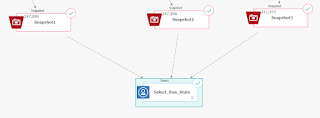
Call Oracle Procedure from IBM Campaign (Unica) process boxes

Image
I had a requirement to run the DBMS Stats on Oracle table after the table is truncated and loaded via snapshot process boxes. without new stats the tables were not returning the data. So I added a new dummy select process box "Select_Run_Stats" after the snapshots (connected with dotted lines) Then Enable the Raw SQL for the select box and enter a dummy SQL which produces the output matching the Audience. Here in the example, the audience was numeric, so I used "select 1 from dual". Now add the statement like below tin the Pre-Processing or Post-Processing section of the configuration. Now as this is a dummy select box, it doesn't matter whether you put it in pre or post section. But remember, pre-processing statements are run before the actual select statement you entered in the select process box (here "select 1 from dual") and post-processing runs after the actual select statement. BEGIN dbms_stats.gather_table_stats('schema_name...