Posts

Showing posts with the label Schema

A Required field is NOT Required in some cases in AEP

Image
 We mark a field as "Required" while defining the XDM schemas. Obviously if you mark a field as required, you need to pass the value of the corresponding field while loading data into the dataset created from the schema. But there are some cases where you can load data even without supplying values for those fields. Let's get into the details. Here the fields marked with pink are the fields marked as required. Here one field of type object called "node_filed_rf" (RF is Required Field and ignore the spellig ) is marked as required whereas the other similar object "node_filed_nrf" is not required. Both of them has a Required Field. We created a DataSet from the schema with the same name as the schema. Here is the sample data that is loaded into the Dataset with error threshold as 80% as we expect many of the rows will not be accepted. Test JSON Data Success Comment {"_id":" all_fields_exist ","_abccominc":{"node_...
How to make Offer Code mandatory and unique

Image
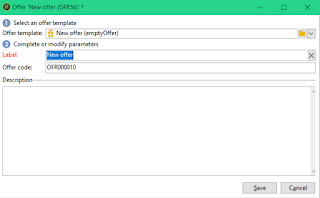
While working on a requirement on Adobe Campaign Classic, I got a requirement to make the offer code mandatory and unique. Initially it seemed to be an easy requirement as I can just create a unique key on the offer code field. But later realized that, every offer has another version of the same stored in the same schema nms:offer for the live environment. Adobe automatically creates the internal name as ogininalName_liveRcp while deploying the offer to the live environment (don't know how that is done yet, may be a post for future :)). But for other fields, it is copied as is and so is the offer code too. So unique key is not option. Then thought, if I add another field in the nms:offer schema for the environment and make the key with offer code + the environment. But same deployment problem, how do I set the env variable as part of deployment? So decided to go with the toughest but cleanest solution, SOAP call from input form. Here are the steps for the same. You can follow a...

Adobe Campaign Schema - Template vs Aggregate

Image
While looking into the schema, I saw in some places we are referring to an element of a different schema instead of declaring it again and again. But in some places, it is done using template attribute and other places use aggregate attribute. So to test, I though of using the element "auditTrail" declared inside the library xtk:common The element is as as below   <element name="auditTrail">     <element defOnDuplicate="true" name="createdBy" template="xtk:common:createdBy"/>     <element defOnDuplicate="true" name="modifiedBy" template="xtk:common:modifiedBy"/>     <attribute defOnDuplicate="true" default="GetDate()" desc="Creation date" label="Creation date"                name="created" type="datetime"/>     <attribute defOnDuplicate="true" default="GetDate()" desc="Modification date...

Adobe Campaign: Call Java Script from Input Form

I came across a scenario where I need to do some custom auditing when some fields are  changed via an input form. So for that I had to call javascript functions from an input form. I have custom schema as cus:Preference with 1:1 join with nms:Recipient. And audit was required to capture who is making change to the preference page if any. Step 1: Create an entry in the input form for the soapCall.  <form>   <container > <!--Enter the form fields here-->   </container>   <leave> <!--servi = "name of the schema where the method is declared"-->     <soapCall name=" auditPreference " service=" cus:Preference ">       <param exprIn="[@id]" type="int"/>       <param exprIn="[@recipientId]" type="int"/>       <param exprIn="[@prefAllCommunications]" type="boolean"/>       <param exprIn="[@prefAllCommunicationsModifiedDat...