Posts

Looping using subset inside a big batch in Adobe Campaign
Image
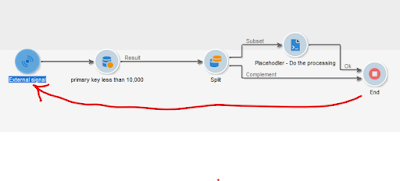
 I had many scenarios where I ran a costly query to select some good no of records and then process them further. But when it comes to processing I had to restrict the number of records to be processed in one go. And once the subset is processed, then select from the table again and then process the subset. Something like below where the end activity calls the signal when the complement from Split has more than 0 records to start the whole process again. But the problem is every time you have to run the costly select process to process a fraction of the records. As a result the overall throughput is decreased heavily. As an alternate I used a looping through the selected records avoiding selection every time I need to process the subset. Here the JS Activity after select is dummy one but required. I added a log in it with count. Test activity is also needed to ensure we have the exit path from the loop. In the above example the select query fetched 8680 records and then split restr...

Tricks of Adobe Campaign to store long field

The SQL Generated by Campaign created the string column with 255 chars like sFieldName VARCHAR2(255 CHAR) or similar depending on the the SQL type. So even if you need to store a field that requires bigger length, it  fails. The below trick I applied into a Campaign Standard implementation, but the code example is using Campaign Classic as I currently don't have access to the standard instance. In my case I had to create a calculated value which requires more than 255 char in length and it was complaining due to the length of the field. My ACC DB is Oracle and here is the error I got. ORA-210000 Oracle error: ORA-12899: value too large for column "AC_APPUSER"."WKF12862341_31_1"."SEXPR1676832221" (actual: 276, maximum: 255) Resolution: AC Standard Code: Read Option Variable: Add a field in Enrichment or Select Activity Additional Data using the expression $(options:<Name of the Option Variable>). Example: $(options:MyAPIKey)

Broadlog Resequencing in Adobe Campaign Classic

 As we all know, the max value for any auto primary key field in Adobe is limited by the max of int which is 2.15B [[+/-) 2,147,483,647]]. As ACC doesn't support bigint as the auto pk column data type, you have to recycle the number every time it reaches near to that 2.14B mark.  Now Broadlog tables being the most heavily used table in ACC, we observe the issue often with this table but this can happen with other tables as well like Tracking and so on. It is not difficult to recycle the value of the sequence in ACC, but most of the time the BL and TL data is shared with downstream systems. So, once you reset the sequence, you have to make sure the downstream system knows about it and handle it properly without overwriting the existing historical records. And that is where these types of challenges are faced How do we inform downstream when ACC is resetting its sequence If downstream is managing the uniqueness of the records, then they have to prefix something to make sure it i...

Base 64 Encoding using Adobe Campaign Standard

 For one of the integration we had to do the base64 encoding using ACS and it was not that easy initially with the existence of the "MYTH" that ACS doesn't support JavaScript. Here is the code where I declared a class Converted inside a Content Block (it has to be block, not fragment) named "cbBase64EncodeLib" Note this process is only applicable if you have to use the encoded output inside email, it will not work if you need to save the value in a table <% var Converter ={         _keyStr : "ABCDEFGHIJKLMNOPQRSTUVWXYZabcdefghijklmnopqrstuvwxyz0123456789+/=",         hexToBase64: function(hex) {             //var str = Converter.hexToString(hex);             //return Converter.base64Encode(str);             var hexStr = hex.toString(); //force conversion             var binary = "";           ...

User Custom Event Variables in Adobe Campaign Standard Workflow

Image
We all are very much familiar with variables in Campaign Classic. But in Standard, it is not easy to declare or use variables inside workflow. There are activities like Load File, Transfer File and other which supports the variables like var.filename or other activities supporting var.reccount in the same way as Classic. But using custom variable is not as simple as ACC and here is one of the ways I tried The first End Activity is calling the Signal activity and while calling, passing the variables and their values as below Below  Signal activity is configured with the same set of variables as the End Activity above. Also you have the option to mention the data type of the variables (String and Number in this case). In the Query Activity (which for no reason I choose the Sending Log as dimension), you can add the variables using the syntax $(var/@varName) format as was used in Classic. Also the $Int exists as well. I tried to check different outcomes as you can see in the screensho...

Displaying data in an email from one to many relation table

Image
We know that boradLogRcp has a one to many relationship (1 to N) with recipient schema. So for every recipient I want to show all the emails sent to him/her Create a simple workflow to select the recipients of your choice Add a delivery/recurring delivery and pull the OTB default email template and configure it with below code <TABLE> <TBODY> <TR> <TD>Campaign name</TD> <TD>Delivery Name</TD> <TD>Event Date</TD> </TR> <% for(var i = 0 ; i<recipient.broadLog.length; i++) { document.write("<tr>"); document.write("<td>" + recipient.broadLog[i].delivery.operation.label + "</td>"); document.write("<td>" + recipient.broadLog[i].delivery.label + "</td>"); document.writ...

Avoid Proxy for HttpClientRequest - IOB-090007 Network error (send(), errno=10054: an existing connection was forcibly closed by the remote host

This is Friday night 8:10 PM and I was frustratingly stuck with an annoying issue on something that I have done so many times, but still unable to figure out what is wrong since last night. Finally it was a silly mistake and I found that. So wanted to capture it so that I don't need to spend another day and half just to figure out why the same thing is not working I was making a call to Silverpop XMLAPI to get the jessionid via the login method. And the code is something like below, very basic one var http = new HttpClientRequest ( "http://api2.ibmmarketingcloud.com/XMLAPI" ); try { http . method = 'POST' ; http . header [ "ClientId_Internal" ] = "XYZABCD" ; http . header [ "ClientSecret_Internal" ] = "DSFDSOFNJSDF" ; http . header [ "Content-Type" ] = "application/x-www-form-urlencoded" ; var reqestBody = "xml=" + encodeURIComponent ( "...